Klarbefund

Relate by Neo4j Hackathon · NODES 2026

Your lab reports, in a graph you own.

Klarbefund reads the paper lab reports from your doctor on the iPhone and keeps them, with your Apple Watch data, in one Neo4j Relate graph on your own iPhone and Mac. Encrypted, local, no cloud. Then you ask Claude, or a model on your Mac, what it means.

One TestFlight link for both apps · iPhone with iOS 26 · Mac with macOS 14 or later · Klarbefund is German for "clear findings"

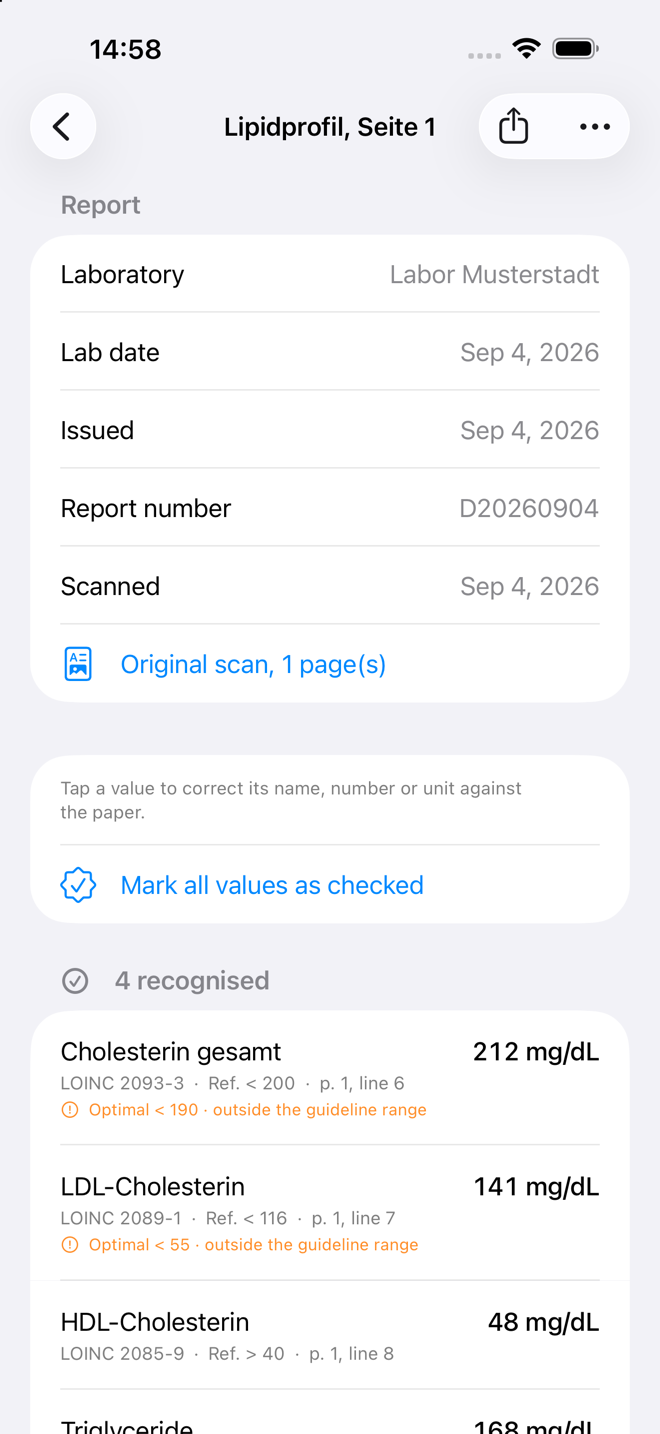
Klarbefund for Mac: pair your iPhone by QR code, your health graph with its counts and Open 3D view, ask your AI (fictional demo data) Klarbefund on the iPhone: a lipid panel with each value, its LOINC code, the reference range and the page and line it came from (fictional demo data)

Two apps, one graph.

Health data sits on paper, in PDFs and in a dozen apps that do not talk to each other. Klarbefund puts it into one connected graph, and the graph stays on hardware you own.

iPhone: capture

Scan a lab report, import a PDF or take a photo. Every value is read, coded with LOINC and kept with the page and line it came from. Apple Health adds weekly means from your watch.

Mac: keep and explore

Pair once by QR code. Your reports arrive over your own Wi-Fi, into a Relate graph sealed with AES-256 when the app is closed. Open it in 3D, answer the questionnaires, see your risks.

AI: ask, read-only

One click connects Claude Desktop. ChatGPT, Gemini CLI or a local model in LM Studio work too. They read the graph through an MCP server that refuses every write.

Klarbefund for iPhone

From paper to coded values, in your pocket.

Klarbefund reads German and English lab reports on the device, with Apple's text recognition. Nothing is uploaded to read them.

  1. Scan, import or photograph a report. Klarbefund finds the lab, the date and each value with its unit and reference range.
  2. Check it against the paper. Every value shows its LOINC code and the page and line it was read from, so a wrong digit is one tap to fix. Lab-issued digital reports are marked final, scanned ones preliminary until you check them.
  3. See where you stand. The range printed by the lab, the guideline range and an optimal range, each with its source. A value outside the guideline range is flagged.
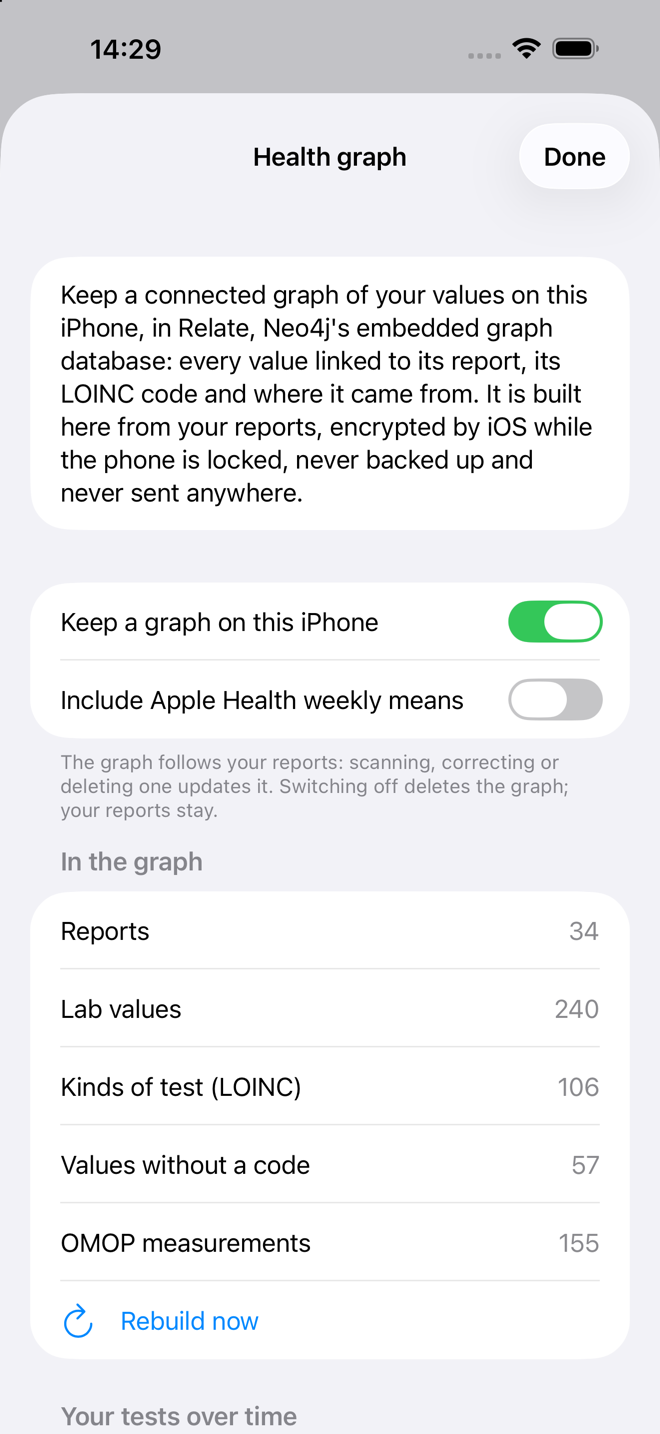
  4. Watch the trend. A graph on the iPhone links every value to its report and its code, so the same test from three labs becomes one line over the years. Apple Health adds resting heart rate, HRV, steps, weight, VO2 max, sleep stages and more as weekly means.
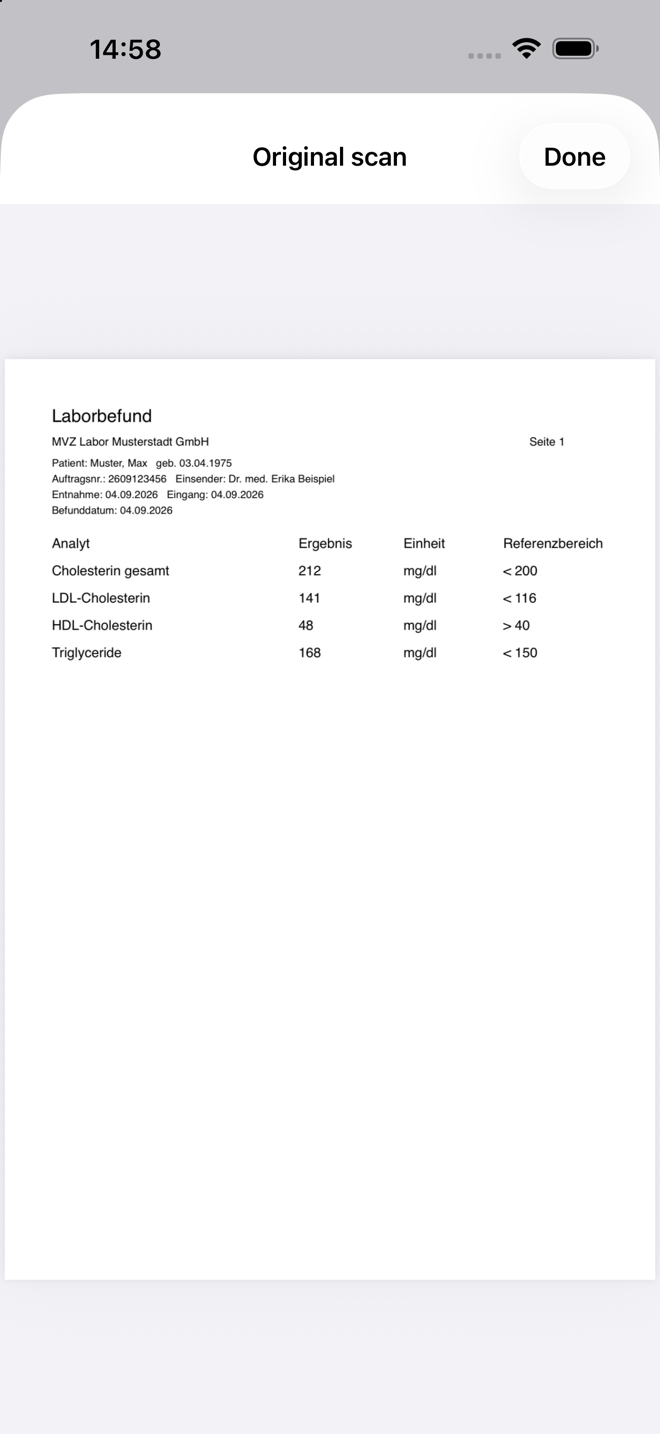
The original scan of a fictional lab report
The paper, kept as scanned
The values read from the report, with LOINC codes and source lines
Each value, coded and traceable
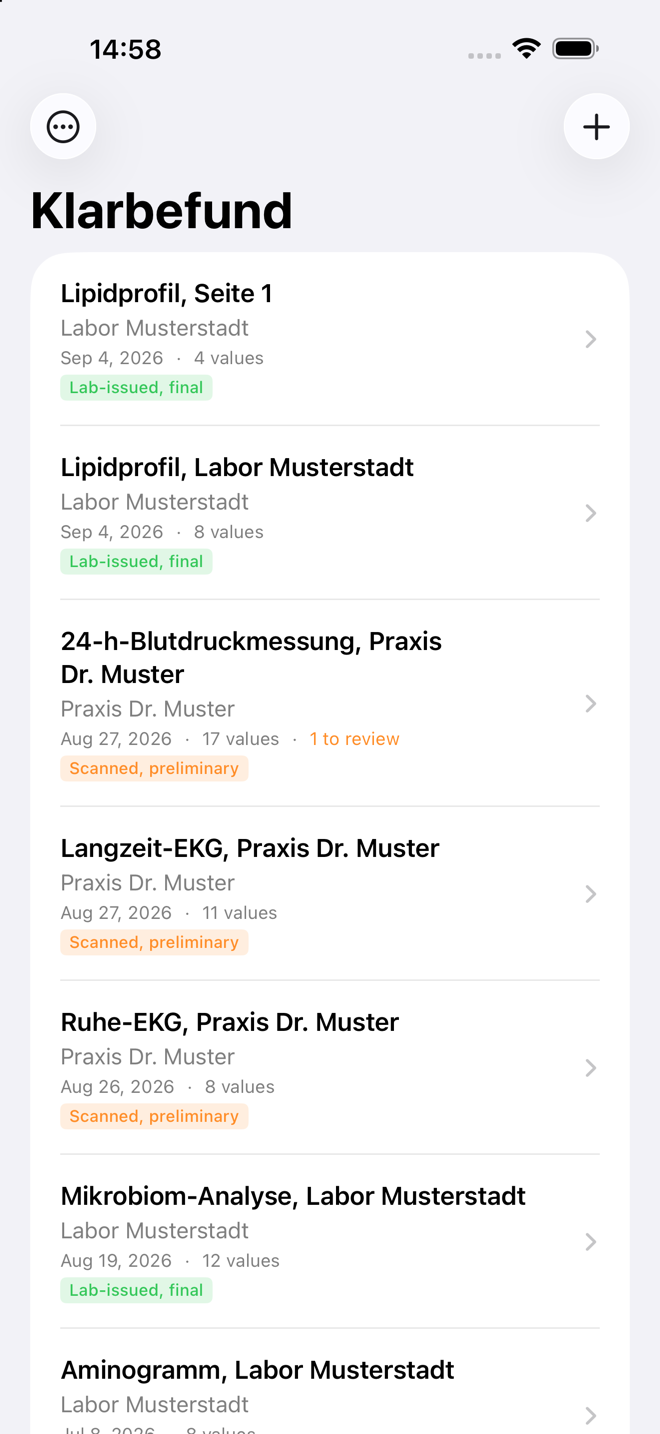
The list of lab reports in Klarbefund
All reports, final or to review
The health graph on the iPhone: reports, lab values, LOINC codes, OMOP measurements
A Relate graph on the iPhone

All screenshots show fictional demo data.

Klarbefund for Mac

Three steps. No terminal.

Klarbefund for Mac is the home of your graph: it receives what the iPhone sends, keeps it sealed, and lets an AI read it while the app is open.

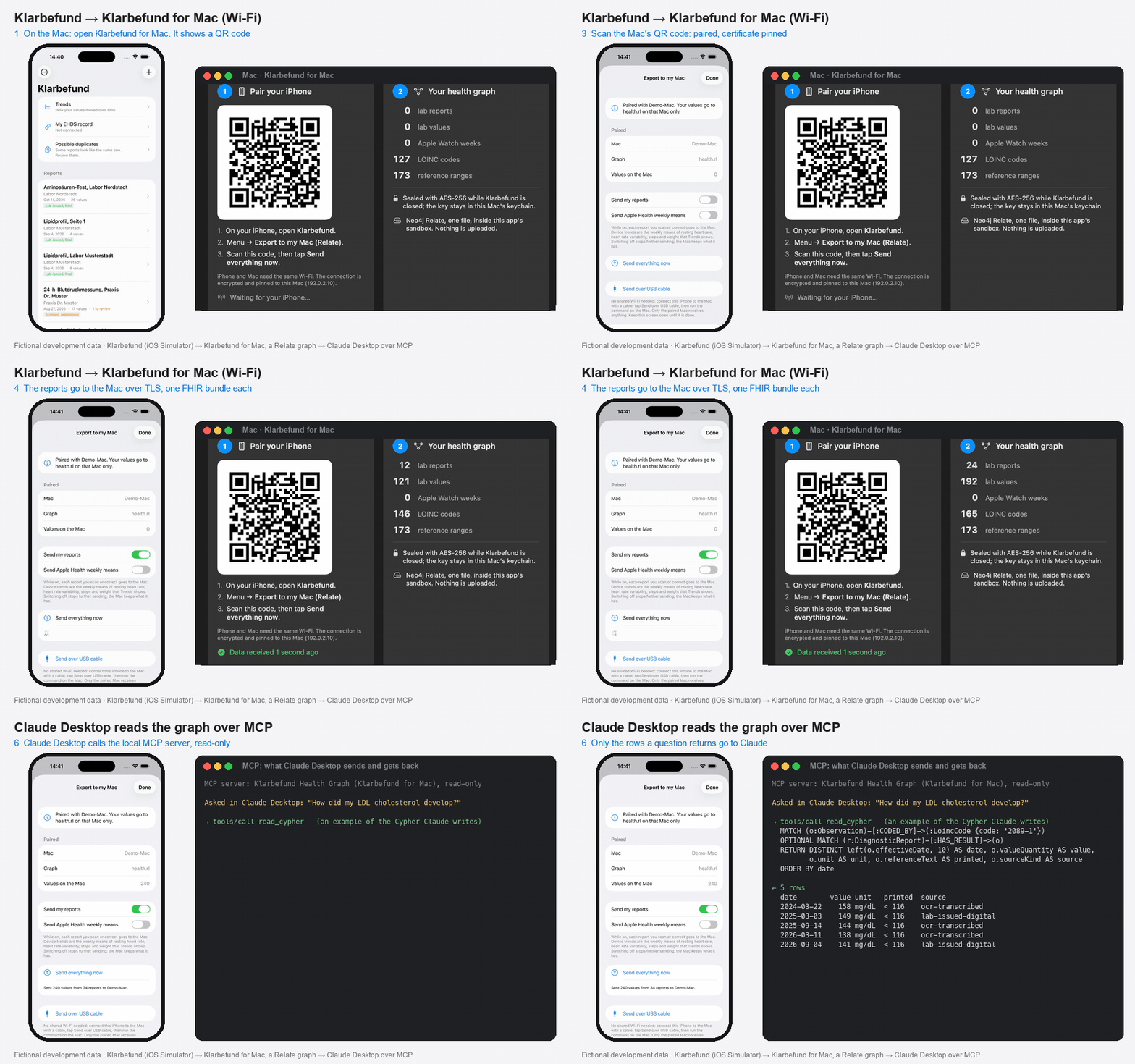
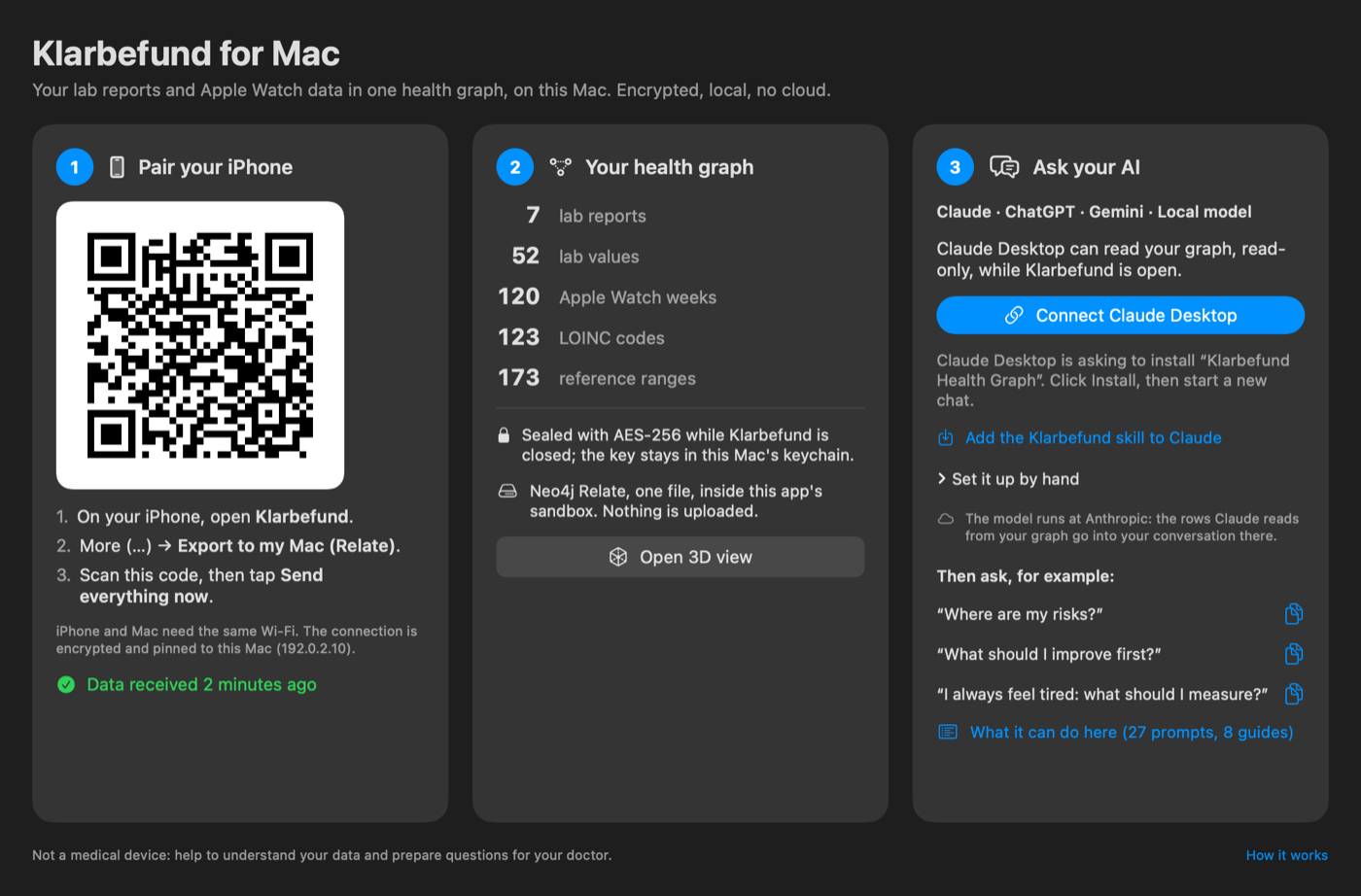
  1. Pair your iPhone. On the iPhone open Klarbefund, More (…), Export to my Mac (Relate), and scan the QR code the Mac shows. Then tap Send everything now. From then on, every report you scan or correct is sent by itself.
  2. Your health graph. The Mac counts your reports, values, Apple Watch weeks and the 173 reference ranges the app brings along. Open 3D view shows it all: your main risk in the middle, then the risk scores, the evidence, your answers and your values.
  3. Ask your AI. Connect Claude Desktop installs the Klarbefund extension with one click: 27 ready prompts and 8 guides, from "Where are my risks?" to a six-minute briefing for your doctor's visit.
Claude DesktopChatGPT for MacGemini CLILM Studio (local)
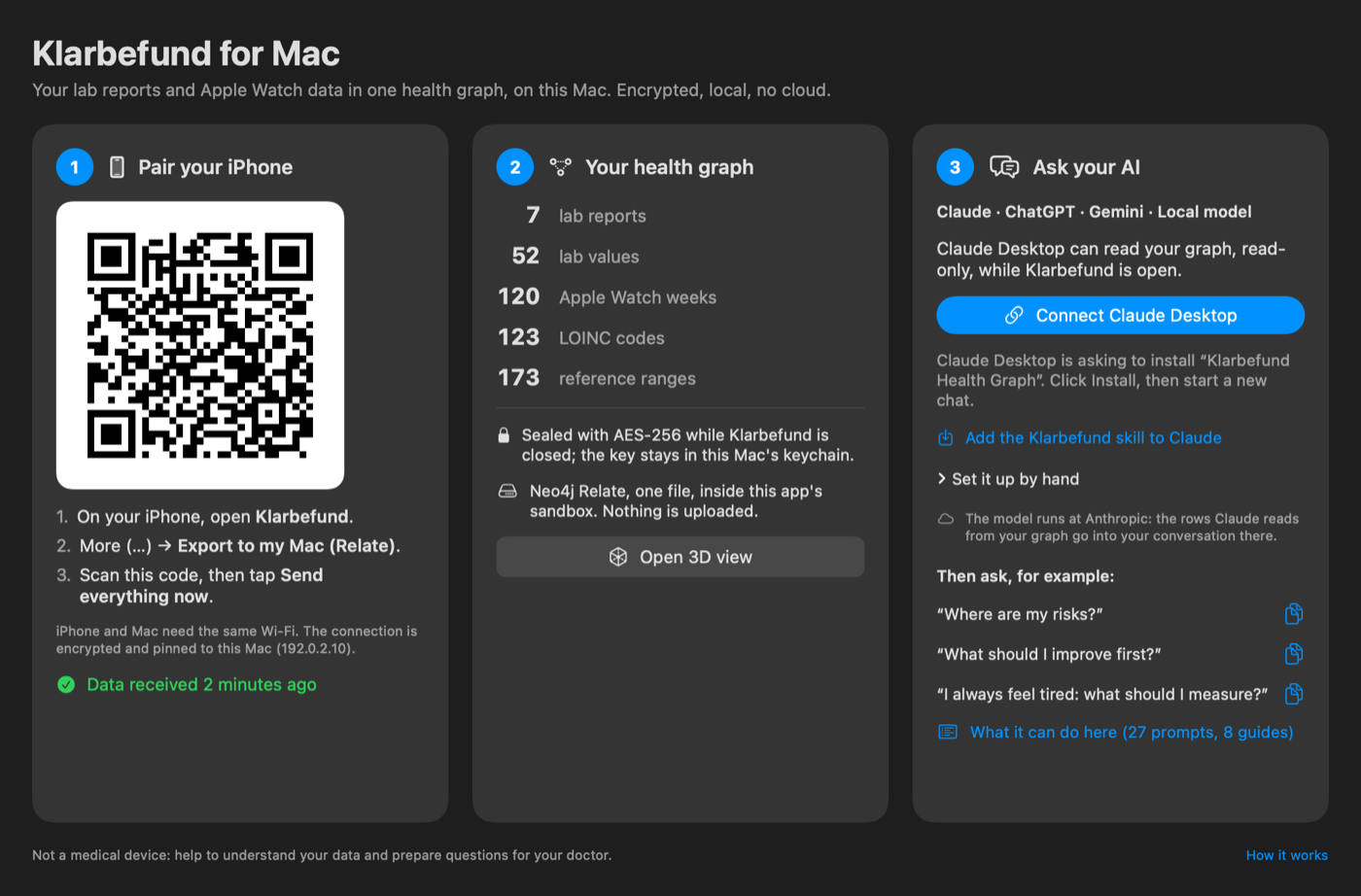
Klarbefund for Mac with its three steps: pair your iPhone, your health graph, ask your AI (fictional demo data)

Anamnesis

Validated questionnaires (Life's Essential 8, FINDRISC, AUDIT-C, MEDAS-14, PHQ-2 and more), prefilled from your values where they can be, stored in your graph once you confirm them.

Knowledge in the graph

Health risks, published risk scores such as SCORE2, the markers the guidelines name, and the studies behind each link, all as nodes next to your values.

How the two talk to each other.

No server in between. The iPhone sends straight to the one Mac it was paired with, and only to that Mac.

iPhone

Each report as a FHIR R4 bundle (Patient, DiagnosticReport, Observations, Provenance); Apple Health as weekly-mean Observations on the same LOINC codes.

HTTPS on your Wi-Fi, certificate pinned by the QR code

Mac

The receiver inside Klarbefund for Mac writes one Relate file, health.rl. A report sent again replaces the old one, never doubles it. OMOP CDM rows are derived for research tools.

MCP over stdio, read-only snapshot

Your AI

Writes Cypher against the schema, gets at most 500 rows back, and cites the report, the date and the lab for every number.

Animation: the Mac shows a QR code, the iPhone scans it, pairs and sends its reports, the Mac counts them in its Relate graph, and Claude Desktop asks the graph about LDL cholesterol (fictional data)

The whole way with fictional development data.

Private by construction.

Each person's whole graph is one file, so it can be protected as one unit. That is what Relate's single-file mode makes possible.

On the iPhone

The graph lives in the app's sandbox under iOS Data Protection (complete), excluded from backup, and goes only to the paired Mac.

On the Mac

Sealed with AES-256-GCM whenever Klarbefund for Mac is closed. The key stays in this Mac's keychain. Pinned TLS on the way, no cloud.

For the AI

A read-only copy, only while the app is open. Write queries are refused. Claude, ChatGPT and Gemini run in their makers' clouds, so the rows they read go there; a local model keeps everything on the Mac.

Evidence that earns its place.

The graph says which risk raises which, and with how much certainty. A newer study only changes such a link after it passes three checks. Looking sound on first read is not enough.

Layer 1Form

Peer-reviewed and not retracted, a design that can answer the question, registered in advance, the analysis prespecified.

Layer 2Precision

Judged by the confidence interval, as GRADE does: does it include both no effect and an effect that matters? Enough events or participants? Small trials are flagged, because they tend to overstate effects.

Layer 3Risk of bias

Judged by a person with the established tools (RoB 2, ROBINS-E, AMSTAR 2). Until that is done, a study that passed the first two layers stays provisional.

passedprovisional: risk of bias not yet judged by a personfailed, with the reason

The 3D view on the Mac shows each study with its status and the reasons. Method and worked examples: statin tolerance appraisal.

Try it.

  1. Join the beta with the TestFlight link, on the iPhone and on the Mac. It is one link for both apps.
  2. Scan a lab report in Klarbefund on the iPhone, or several. Allow Apple Health if you wear a watch or ring that syncs to it.
  3. Open Klarbefund for Mac and pair: More (…), Export to my Mac (Relate), scan the code, Send everything now. Mac and iPhone need the same Wi-Fi.
  4. Connect Claude Desktop in step 3 and ask: "Where are my risks?"

No iPhone at hand? The repository has a synthetic sample graph, examples/health-graph/health.rl, that you can query with the Relate CLI and serve to Claude: try it with the sample graph.

Klarbefund is not a medical device. It helps you understand your data and prepare questions for your doctor. Both apps are in development and testing, so they are on TestFlight only, not on the App Store.
QR code for the Klarbefund TestFlight beta

Scan to join the beta